
AI Fundamentals — Everyday AI
Course overview
You've heard about ChatGPT, Copilot, Gemini and Claude. Maybe you've tried one. Maybe a grandchild set it up for you, or your boss told you to "use AI" with no instructions. This workshop gives you four things in four sessions:
- Understand what AI is and how it comes up with answers.
- Use it with prompts that actually work.
- Protect your private information and check what AI gets wrong.
- Create something useful you'll keep using.
No coding. No jargon you won't get a translation for. Bring a phone, tablet or laptop.
Learning outcomes
- Explain in your own words how a chatbot produces an answer and why it can be confidently wrong.
- Write prompts using the R.E.C.I.P.E. method.
- Name five kinds of information you should never paste into an AI tool.
- Fact-check an AI answer in under two minutes.
- Spot AI-powered scams: voice clones, fake videos, fake "AI investment" pitches.
- Build a personal "AI toolkit": three prompts you'll use every week.
Session plan
| Session | Theme | You leave with |
|---|---|---|
| 1 | Understand: What AI is and how it answers | Your first conversation with an AI tool + a "what AI is / isn't" card |
| 2 | Use: Prompts that work | The R.E.C.I.P.E. card + 3 saved prompts |
| 3 | Protect: Privacy, accuracy and scams | The "Never paste" list + the 2-minute fact check |
| 4 | Create: Make something useful | A finished project (letter, plan, flyer, budget, study guide) |
Tools we use
Any free general AI assistant works: Microsoft Copilot, ChatGPT, Google Gemini, Claude or Meta AI. Facilitators should check each tool's current age requirements and terms before class; many require users to be 13+ (and some 18+, or 13–17 with parental permission). If a school or agency provides an approved tool, use that.
Session 1 — Understand: what AI is and how it answers
1.1 Warm-up (10 min)
Ask the room: "Where did you already use AI this week without calling it AI?" Collect answers: phone autocorrect, face unlock, Netflix suggestions, spam filters, GPS traffic, bank fraud alerts, smart speakers.
Dope Translation: AI has been in your pocket for years. Autocorrect is AI. "Recommended for you" is AI. The new chatbots are just the version that talks back.
1.2 What AI is
Artificial intelligence is software that learns patterns from lots of examples so it can make predictions or create things — instead of following only rules a person typed in by hand.
| Kind | What it does | Example |
|---|---|---|
| Predictive AI | Guesses what's likely | Fraud alert from your bank |
| Recognition AI | Identifies things | Face unlock, voice assistants |
| Generative AI | Creates new text, images, audio, video | Chatbots, image makers |
| Agentic AI | Takes steps and actions for you | An assistant that books an appointment |
1.3 How a chatbot answers
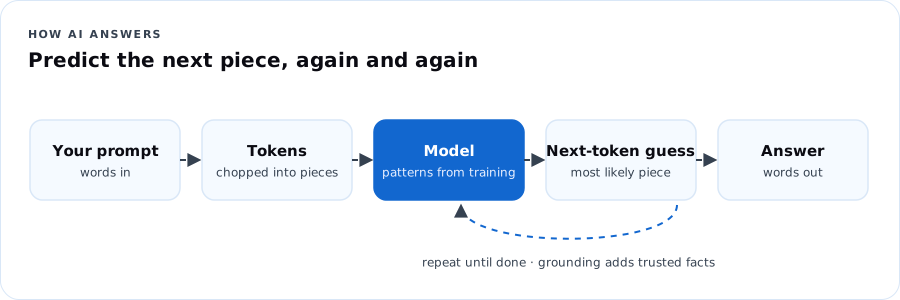
- It learned from enormous amounts of text.
- Your question gets broken into pieces (tokens).
- It predicts, one piece at a time, what words most likely come next.
- It doesn't "look up the truth" unless it's connected to search or documents — it predicts.
Dope Translation: Picture the friend who's been on every group chat in the city for twenty years. Start a sentence and they can finish it — smooth, confident, in your style. But sometimes they're just making it sound right. That's AI. Great at sounding right. Your job is checking if it is right.
1.4 What AI is — and isn't
| AI is | AI isn't |
|---|---|
| Fast at drafting, summarizing, explaining, brainstorming | A person, a friend, or a professional with a license |
| Good with patterns in language | Always correct, current or fair |
| A tool you direct | Responsible for decisions — you are |
1.5 Hands-on (40 min)
- Open your AI tool. Type: "Explain what you are in three sentences, like I'm 12."
- Ask: "What's one thing you're bad at?"
- Ask it something you already know well — your neighborhood, your job, your favorite team's 2023 season. Grade it. Where was it wrong?
- Share one surprising right answer and one wrong answer with your table.
Session 1 check
Try it first. Move forward with confidence.
Workshop pricing set by host organization · free for some partner programs
Choose a class or cohort that fits your starting point.
Community workshop (in person or live virtual) · also self-paced
Ask about enrollmentAlready enrolled? Check your course accessThis page includes the course overview, one sample lesson and up to three practice questions. Remaining lessons, labs, capstone and the full practice bank are reserved for enrolled learners. Microsoft exam fees are separate where shown. Cohort dates and included support are confirmed before enrollment.