
AZ-104 Azure Administrator
Course overview
If AZ-900 taught you the language, AZ-104 teaches you to run the building. Azure administrators create identities, assign access, enforce policy, build networks, deploy compute, protect storage, watch everything and recover when it breaks. This course follows Microsoft's skills outline as of April 17, 2026 and puts a keyboard in your hands for every objective — portal and command line and Bicep.
The exam at a glance
| Item | Detail |
|---|---|
| Exam | AZ-104: Microsoft Azure Administrator |
| Credential | Microsoft Certified: Azure Administrator Associate |
| Passing score | 700 |
| Price | $165 USD in the U.S. (varies by country) |
| Renewal | Annually, by a free online assessment on Microsoft Learn |
| Recommended background | OS, networking, servers, virtualization; PowerShell, Azure CLI, the portal, ARM templates or Bicep, Microsoft Entra ID |
| Free prep | Study guide · Practice assessment · Exam sandbox |
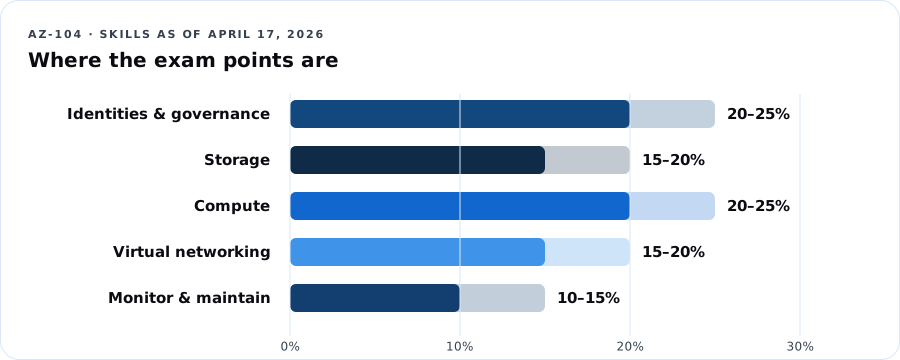
Exam weights (current)
| Domain | Weight | DCT lessons |
|---|---|---|
| Manage Azure identities and governance | 20–25% | 1, 2, 3 |
| Implement and manage storage | 15–20% | 4, 5 |
| Deploy and manage Azure compute resources | 20–25% | 6, 7 |
| Implement and manage virtual networking | 15–20% | 8, 9 |
| Monitor and maintain Azure resources | 10–15% | 10 |
Learning outcomes
- Manage Entra users, groups, licenses, guests and SSPR.
- Assign and interpret Azure RBAC at every scope.
- Govern subscriptions with Policy, locks, tags, management groups and budgets.
- Secure and configure storage accounts, SAS, keys, redundancy, replication and encryption.
- Operate Blob Storage and Azure Files: tiers, soft delete, snapshots, lifecycle, versioning.
- Read, modify and deploy ARM templates and Bicep files.
- Build and manage VMs, disks, zones, scale sets, containers and App Service.
- Build VNets, peering, routes, NSGs/ASGs, Bastion, service and private endpoints, DNS and load balancers — and troubleshoot them.
- Monitor with metrics, logs (KQL), alerts, Insights and Network Watcher.
- Back up and recover with Recovery Services vaults, Backup vaults and Site Recovery.
Lab environment
- Your own Azure subscription (pay-as-you-go with a $25 budget, or Azure for Students). Every lab ends with a teardown step. Budget ~$10–20 total if you tear down promptly.
- Tools: Azure portal, Cloud Shell (Bash), optionally local Azure CLI and VS Code with the Bicep extension.
- Naming convention used:
rg-104-<lesson>, regioneastus(swap for yours). - Microsoft's free official lab repo: AZ-104 labs on GitHub.
Watch your wallet: Bastion, VPN gateways, Application Gateway, Site Recovery and premium SKUs bill by the hour whether you use them or not. Labs that create these tell you to delete them the same day.
Assessment
| Component | Weight |
|---|---|
| Lesson knowledge checks (10) | 20% |
| Labs with evidence (10) | 40% |
| Capstone: build and defend "Ward 7 Community Health" environment | 25% |
| 50-question practice exam | 15% |
Lesson 1 — Microsoft Entra users and groups
Exam objectives: create users and groups; manage user and group properties; manage licenses in Entra ID; manage external users; configure SSPR.
1.1 Identities you'll manage
| Object | Notes |
|---|---|
| Member users | Cloud-only or synced from on-prem AD (Entra Connect / Cloud Sync) |
| Guest (external) users | B2B collaboration; UserType = Guest; invited by email; sign in with their own identity |
| Security groups | Grant access to resources and apps |
| Microsoft 365 groups | Collaboration (shared mailbox, Teams, SharePoint) |
| Assigned vs. dynamic membership | Dynamic groups use rules like (user.department -eq "Finance") — requires Entra ID P1 |
Dope Translation: You're running HR and the front desk at the same time. Users are employees. Guests are vendors with a visitor badge. Groups are crews — give the crew the key once instead of cutting 40 separate keys.
1.2 Licenses
Licenses (Microsoft 365, Entra ID P1/P2) are assigned to users or groups (group-based licensing). A user needs a usage location set before a license can be assigned. Group-based licensing is the admin-efficient answer on the exam.
1.3 Self-service password reset (SSPR)
- Scope: None / Selected (one group) / All.
- Authentication methods required: 1 or 2 (admins always need 2).
- Methods: mobile app notification/code, email, mobile phone, office phone, security questions (not for admins).
- Registration can be required at next sign-in; re-confirm every N days.
- Password writeback (for synced users) requires Entra Connect/Cloud Sync and P1.
1.4 Beyond the exam — but your job
Privileged Identity Management (PIM): just-in-time, time-bound admin roles with approval (Entra ID P2). Not in the AZ-104 outline; it's covered in DCT Cloud Security and SC-500.
Lab 1 — Identity operations (60 min)
# Create a user
DOMAIN=$(az ad signed-in-user show --query userPrincipalName -o tsv | cut -d@ -f2)
az ad user create --display-name "Kai Brooks" \
  --user-principal-name kai.brooks@$DOMAIN \
  --password "Use-A-Long-Passphrase-2026!" --force-change-password-next-sign-in true

# Create a security group and add the user
az ad group create --display-name "sg-helpdesk" --mail-nickname sg-helpdesk
az ad group member add --group sg-helpdesk \
  --member-id $(az ad user show --id kai.brooks@$DOMAIN --query id -o tsv)
Portal tasks:
1. Set Kai's usage location and department = IT.
2. Users → New user → Invite external user: invite a personal email address as a guest. Accept it from that inbox.
3. Password reset → Properties: enable SSPR for Selected → sg-helpdesk, 2 methods.
4. If you have a P1 trial: create a dynamic group dg-it with rule user.department -eq "IT" and watch Kai appear.
Evidence: screenshots of group membership, guest user (UserType Guest), SSPR settings. Teardown: delete test users and guest.
Lesson 1 knowledge check
Try it first. Move forward with confidence.
$597 course path · Microsoft exam fee separate ($165 US)
Ten lessons and about 40 hours of instruction and labs.
Live virtual, hybrid, or self-paced with weekly office hours
Ask about enrollmentA $597 total investment across 10 lessons — equivalent to $59.70 per lesson, paid at the stated course price.
Already enrolled? Check your course accessThis page includes the course overview, one sample lesson and up to three practice questions. Remaining lessons, labs, capstone and the full practice bank are reserved for enrolled learners. Microsoft exam fees are separate where shown. Cohort dates and included support are confirmed before enrollment.