
AZ-900 Azure Fundamentals
Course overview
AZ-900 is Microsoft's entry certification for Azure. It proves you can describe cloud concepts, Azure's architecture and services, and how Azure is managed and governed. You don't need to be technical to pass it, but you will leave able to talk shop with technical people.
This course follows Microsoft's current skills outline (as of July 20, 2026) line by line, then adds the DCT layer: plain-language translations, real scenarios, and hands-on labs so the vocabulary sticks.
The exam at a glance
| Item | Detail |
|---|---|
| Exam | AZ-900: Microsoft Azure Fundamentals |
| Credential | Microsoft Certified: Azure Fundamentals |
| Passing score | 700 (scale 1–1000) |
| Price | $99 USD in the United States (varies by country; confirm at checkout) |
| Expiration | Fundamentals certifications do not expire |
| Domains | Cloud concepts 25–30% · Azure architecture & services 35–40% · Management & governance 30–35% |
| Free prep | Official study guide · Free practice assessment · Exam sandbox |
Learning outcomes
You will be able to:
- Describe cloud computing, shared responsibility, cloud models and the consumption-based model.
- Explain the benefits of the cloud: availability, scalability, reliability, predictability, security, governance, manageability.
- Classify services as IaaS, PaaS or SaaS and pick the right one for a scenario.
- Describe Azure regions, availability zones, resource groups, subscriptions and management groups and how they nest.
- Compare Azure compute, networking and storage options and choose between them.
- Describe Microsoft Entra ID, authentication methods, Conditional Access, RBAC, Zero Trust, defense in depth and Defender for Cloud.
- Describe cost factors, the pricing calculator, Cost Management and tags.
- Describe Purview, Azure Policy, resource locks, the portal, Cloud Shell, CLI, PowerShell, Arc, IaC and ARM.
- Describe Advisor, Service Health and Azure Monitor (Log Analytics, alerts, Application Insights).
Syllabus
| # | Lesson | Exam domain | Time |
|---|---|---|---|
| 1 | What is cloud computing? | Cloud concepts | 90 + 30 lab |
| 2 | Benefits of the cloud and service types | Cloud concepts | 90 + 30 lab |
| 3 | Azure's core architecture | Architecture & services | 90 + 45 lab |
| 4 | Compute and application hosting | Architecture & services | 90 + 60 lab |
| 5 | Networking | Architecture & services | 90 + 45 lab |
| 6 | Storage, file movement and migration | Architecture & services | 75 + 45 lab |
| 7 | Identity, access and security | Architecture & services | 90 + 45 lab |
| 8 | Cost management | Management & governance | 75 + 30 lab |
| 9 | Governance, compliance and deployment tools | Management & governance | 75 + 45 lab |
| 10 | Monitoring + exam readiness | Management & governance | 90 (incl. practice exam) |
Cloud From Scratch — live 6-session map
For DCT's live community cohort, the 10 lessons compress into six 2.5-hour sessions:
| Session | Covers lessons | Hands-on moment |
|---|---|---|
| 1. Welcome to the cloud | 1–2 | Pizza-model sorting game; create a budget |
| 2. How Azure is built | 3 | Build the hierarchy with sticky notes; create a resource group with tags |
| 3. Computers in the cloud | 4 | Deploy a web app (free tier) |
| 4. Roads and lockers | 5–6 | Draw a VNet; upload files to Blob Storage |
| 5. Who gets in | 7 | MFA + RBAC role assignment walkthrough |
| 6. Money, rules and the dashboard | 8–10 | Pricing calculator challenge, Azure Policy demo, practice exam |
Assessment
| Component | Weight |
|---|---|
| 10 lesson knowledge checks | 30% |
| 6 labs (screenshots + reflection) | 30% |
| Capstone: "Azure for a Small Business" plan | 20% |
| 40-question practice exam (75% target) | 20% |
Recommended exam readiness signal: 80%+ on the DCT practice exam and 75%+ on Microsoft's free practice assessment, twice, on different days.
Lesson 1 — What is cloud computing?
Objectives (exam: Describe cloud computing): define cloud computing; describe the shared responsibility model; define public, private and hybrid; identify use cases for each; describe the consumption-based model; compare pricing models; describe serverless.
1.1 Definition
Cloud computing is the delivery of computing services — servers, storage, databases, networking, software, analytics and intelligence — over the internet, on demand, with pay-as-you-go pricing. Microsoft owns and runs the datacenters; you rent capacity and pay for what you consume.
Dope Translation: Owning servers is buying your own studio — mics, booth, soundproofing, the electric bill — even on days nobody records. Cloud is booking studio time by the hour. Big album drop? Book the big room for a week. Quiet month? Book an hour.
1.2 Shared responsibility
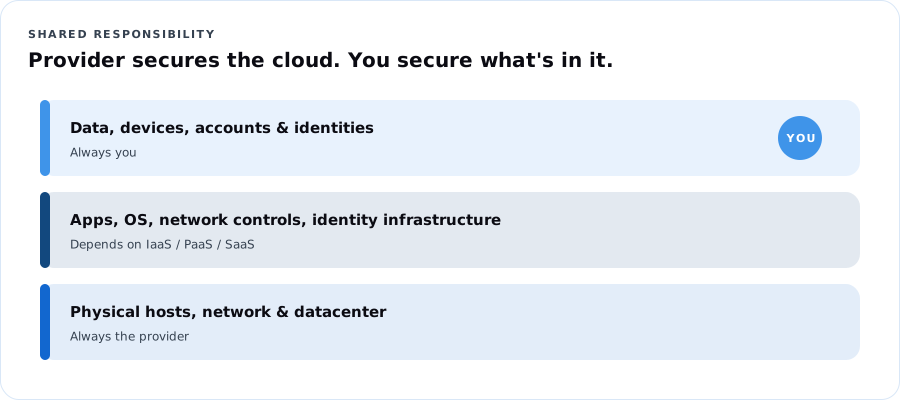
| Always Microsoft | Varies by service type | Always you |
|---|---|---|
| Physical datacenters, physical network, physical hosts | Operating system, network controls, applications, identity infrastructure | Information and data, devices (mobile & PC), accounts and identities |
The more you move from on-premises → IaaS → PaaS → SaaS, the more Microsoft manages. You never hand off your data, your devices, or your accounts.
1.3 Cloud models
| Model | What it is | Use when |
|---|---|---|
| Public | Provider-owned, shared infrastructure; you rent | Fast start, no up-front cost, variable demand |
| Private | Cloud-style infrastructure used by one organization (on-prem or hosted) | Strict control, legacy constraints, specific regulatory rules |
| Hybrid | Public and private connected and working together | Keep some data on-prem while bursting or modernizing in the cloud |
Multi-cloud (more than one public provider) is common too. Azure Arc (Lesson 9) helps manage hybrid and multi-cloud resources from Azure.
1.4 The consumption-based model and pricing models
- Consumption-based: no up-front cost, no buying for peak, pay for what you use, stop paying when you stop using it.
- CapEx → OpEx: moving from buying hardware to paying operating costs.
- Pricing models you should recognize:
| Model | How it works | Good for |
|---|---|---|
| Pay-as-you-go | Per second/hour/GB, no commitment | Unpredictable or short workloads |
| Reservations | Commit 1 or 3 years for a big discount | Steady, always-on workloads |
| Savings plan for compute | Commit to an hourly spend across compute services | Steady spend across changing VM types |
| Spot | Use spare capacity cheaply; can be evicted | Batch jobs, testing, interruptible work |
| Azure Hybrid Benefit | Reuse existing Windows Server/SQL licenses | Orgs that already own Microsoft licenses |
Dope Translation: Pay-as-you-go is buying by the plate. Reservations are a meal plan. Spot is the end-of-night bakery discount — cheap, but they can close the door on you.
1.5 Serverless
Serverless means you write the code (or workflow) and Azure runs, scales and patches everything underneath. You're billed by executions and resources used, not for idle servers. Examples: Azure Functions (event-driven code) and Azure Logic Apps (workflow automation). There are servers; you just never manage them.
Real Talk: A food pantry gets a spike of sign-ups the morning a donation drive is announced. A Function that writes each sign-up to storage costs almost nothing on quiet days and scales automatically on the busy one.
Lab 1 — Your Azure starter (30 min)
- Create a free account at azure.microsoft.com/free (or Azure for Students if eligible). Turn on MFA.
- Create a monthly budget of $5 with alerts at 50%, 80%, 100% (Cost Management → Budgets).
- In the portal search bar, open Subscriptions. Write down the subscription name and ID — that's your billing boundary.
Lesson 1 knowledge check
Try it first. Move forward with confidence.
$297 course path · Microsoft exam fee separate ($99 US)
Build your Azure foundation across 10 lessons.
Live cohort (Cloud From Scratch, 6 sessions), self-paced, or hybrid
Ask about enrollmentA $297 total investment across 10 lessons — equivalent to $29.70 per lesson, paid at the stated course price.
Already enrolled? Check your course accessThis page includes the course overview, one sample lesson and up to three practice questions. Remaining lessons, labs, capstone and the full practice bank are reserved for enrolled learners. Microsoft exam fees are separate where shown. Cohort dates and included support are confirmed before enrollment.