
Cloud Fundamentals 101
Course overview
You already use the cloud. Your phone backs up pictures to it. Your bank app runs on it. The streaming show you watched last night came out of it. This course pulls back the curtain so you can understand it, use it safely, protect your account and your money, and create two real things: a public website and a virtual computer.
DCT courses follow the same four moves every time: Understand → Use → Protect → Create. You will see those words at the top of every module.
What you will be able to do
By the end of this course you will be able to:
- Explain cloud computing in plain language to a family member, a hiring manager, or a customer.
- Tell the difference between IaaS, PaaS and SaaS and name an example of each.
- Compare how AWS, Microsoft Azure and Google Cloud name the same core services.
- Lock down a new cloud account with MFA, a budget alert, and a least-privilege habit.
- Publish a static website from cloud storage.
- Create, connect to, and delete a Linux virtual machine without leaving anything running that costs you money.
- Read a cloud bill and explain what generated each charge.
Who this is for
| If you are… | This course gives you… |
|---|---|
| Brand new to tech | The vocabulary, so meetings and job posts stop sounding like a foreign language |
| A career changer | A first portfolio piece (your website) and a clear next certification |
| A small-business owner | Enough knowledge to stop overpaying and to ask vendors the right questions |
| A senior or parent | Confidence about where your photos and accounts actually live, and how to keep them safe |
| A teen | A real build to show, and a head start on a cert that employers recognize |
What you need
- A computer (Windows, Mac, Linux or a Chromebook) and an internet connection.
- An email address you control and a phone for multi-factor authentication.
- A credit or debit card for cloud sign-up. Providers verify identity with a card. Following the cleanup steps keeps charges at or near zero, but you are responsible for what you create.
- About 6–8 hours, spread across as many days as you like.
How this course is built
| Module | Title | Time | Deliverable |
|---|---|---|---|
| 1 | Understand the cloud | 75 min | Cloud vocabulary card |
| 2 | Protect your account (and your wallet) | 60 min | Hardened account + budget alert |
| 3 | Build a website | 90 min | A live static website URL |
| 4 | Explore a virtual machine | 90 min | Screenshot of your VM terminal + clean deletion |
| 5 | Check your knowledge and clean up | 45 min | Final check (20 questions) + cleanup checklist |
How you are assessed
| Item | Weight | Pass mark |
|---|---|---|
| Module knowledge checks (4) | 40% | 70% each, retakes allowed |
| Build 1: static website (URL submitted) | 20% | Site loads publicly |
| Build 2: virtual machine (screenshot + deletion proof) | 20% | Connected + deleted |
| Final check | 20% | 70% |
Earn 70% overall to receive the DCT Cloud 101 Certificate of Completion. This is a DCT credential, not a vendor certification.
Module 1 — Understand the cloud
Understand. Learning objectives: define cloud computing; describe the five essential characteristics; compare service models (IaaS, PaaS, SaaS) and deployment models (public, private, hybrid, multi-cloud); explain shared responsibility.
1.1 What the cloud actually is
The cloud is other people's computers that you rent over the internet, on demand, and pay for by usage. Those computers sit in giant buildings called datacenters, owned by companies such as Amazon (AWS), Microsoft (Azure) and Google (Google Cloud).
The U.S. National Institute of Standards and Technology (NIST SP 800-145) gives the official definition. Cloud computing has five essential characteristics:
| Characteristic | What it means | Everyday version |
|---|---|---|
| On-demand self-service | You create resources yourself, no phone call or purchase order | Ordering on an app instead of calling the store |
| Broad network access | Reach it from any device over the network | Your email works on your phone and your laptop |
| Resource pooling | Many customers share the same physical hardware, kept separate by software | Apartment building: shared walls and plumbing, private locked units |
| Rapid elasticity | Scale up or down quickly, sometimes automatically | Adding folding tables when more cousins show up to the cookout |
| Measured service | Usage is metered and billed | The electric meter on the side of the house |
Dope Translation: Owning servers is like buying a whole building to run a barbershop. You pay for the roof, the plumbing, the security, and the empty chairs on a slow Tuesday. The cloud is renting a chair by the hour. Busy Saturday? Rent ten chairs. Slow Tuesday? Rent one. You only pay for chairs with somebody in them.
1.2 CapEx vs. OpEx
- Capital expenditure (CapEx): big money up front for things you own — servers, buildings, generators. You pay before you know if the business will use it all.
- Operational expenditure (OpEx): pay as you go for what you use this month. Cloud is mostly OpEx.
Dope Translation: CapEx is buying the car. OpEx is taking a ride share. If you drive every day, owning may win. If you drive twice a month, renting rides is smarter. Businesses do the same math with servers.
1.3 The service models: IaaS, PaaS, SaaS
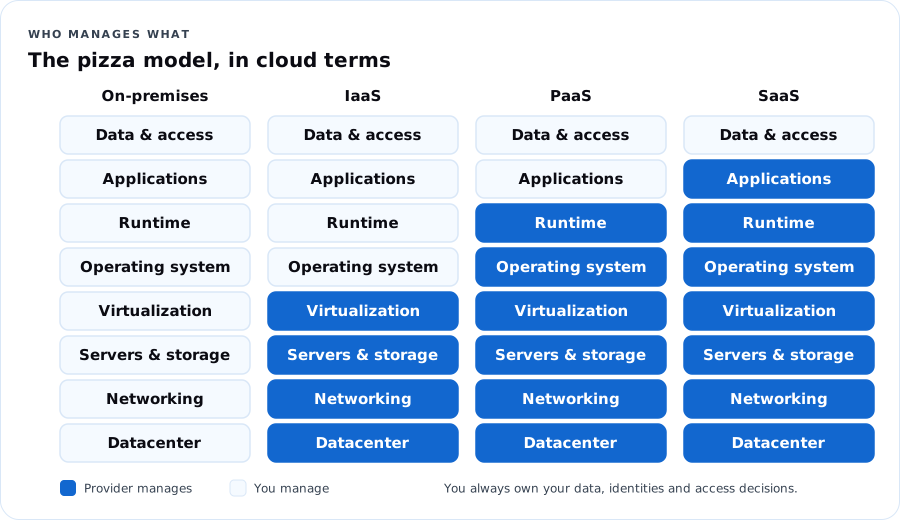
| Model | You manage | Provider manages | Example |
|---|---|---|---|
| IaaS — Infrastructure as a Service | Operating system, apps, data, access | Physical hardware, network, virtualization | Azure Virtual Machines, AWS EC2, Google Compute Engine |
| PaaS — Platform as a Service | Your app code, data, access | Everything underneath, including OS patching | Azure App Service, AWS Elastic Beanstalk, Google App Engine |
| SaaS — Software as a Service | Your data and who can use it | The whole application | Microsoft 365, Gmail, Zoom, Canva |
| Serverless / FaaS | Just the function code | Servers, scaling, runtime | Azure Functions, AWS Lambda, Google Cloud Run functions |
Dope Translationthe pizza model: - On-premises: you make pizza at home. You buy the oven, the flour, everything. - IaaS: you rent a kitchen with an oven. You bring ingredients and cook. - PaaS: you go to a make-your-own-pizza spot. They have the dough and oven; you pick the toppings. - SaaS: you order delivery. You just eat — and decide who gets a slice.
1.4 Deployment models
- Public cloud: shared provider infrastructure, available to anyone with an account. Most of this course.
- Private cloud: cloud-style infrastructure used by one organization only, on-premises or hosted.
- Hybrid cloud: public and private connected and working together. Common in government and banks.
- Multi-cloud: using more than one public provider (for example Azure for identity and email, AWS for a specific app).
Real Talk: A county agency keeps resident records in its own datacenter because of a records law, but runs its public website and email in the public cloud. That is hybrid. When the same agency also uses Google Workspace for a youth program, it is multi-cloud too.
1.5 Shared responsibility — the most important idea in this course
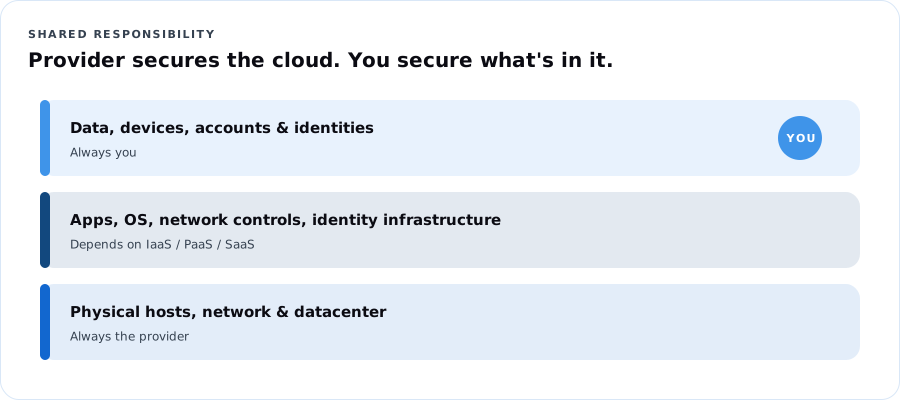
The provider secures the cloud itself (buildings, hardware, the network between datacenters). You secure what you put in the cloud (your data, your accounts, who has access, the settings you choose). As you move from IaaS to PaaS to SaaS, the provider takes on more — but you always own your data, your identities and your access decisions.
Dope Translation: You rent a storage unit. The company owns the fence, the gate, the cameras and the building. But if you leave your unit unlocked, or hand your code to everybody in the group chat, that's on you. Most cloud breaches aren't hackers breaking the fence. They're unlocked units.
1.6 The big three, side by side
| What you want | Azure | AWS | Google Cloud |
|---|---|---|---|
| A virtual computer | Virtual Machines | EC2 | Compute Engine |
| File / object storage | Blob Storage (in a Storage account) | S3 | Cloud Storage |
| A container for resources | Resource group | (Tags / CloudFormation stacks; accounts) | Project |
| Identity & sign-in | Microsoft Entra ID + Azure RBAC | IAM / IAM Identity Center | Cloud Identity + IAM |
| Private network | Virtual network (VNet) | VPC | VPC |
| Firewall rules on a network | Network security group (NSG) | Security group | VPC firewall rules |
| Run code without servers | Azure Functions | Lambda | Cloud Run functions |
| Monitoring | Azure Monitor | CloudWatch | Cloud Monitoring |
| Cost tracking | Cost Management + Budgets | Billing & Cost Management + Budgets | Billing + Budgets |
| Geographic location | Region (with availability zones) | Region (with availability zones) | Region (with zones) |
Takeaway: Learn the concept once. The names change; the ideas do not.
1.7 Regions and availability zones
- A region is a geographic area with one or more datacenters (for example East US or us-east-1, both in Virginia).
- An availability zone is a physically separate datacenter (or group) inside a region with its own power, cooling and networking.
- Put copies of important things in more than one zone so one building's outage does not take you down.
Dope Translation: Don't keep all your money in one shoebox. A zone is a second shoebox in a different room. A second region is a shoebox at your aunt's house across town.
Module 1 knowledge check
Try it first. Move forward with confidence.
$97 one-time
Five modules. Two real builds. One clear starting point.
Self-paced digital starter · Gumroad delivery
Get the $97 Cloud 101 starter on GumroadYour purchased starter is delivered through Gumroad. Keep your receipt and use your Gumroad library to access it.
Already enrolled? Check your course accessThis page includes the course overview, one sample lesson and up to three practice questions. Remaining lessons, labs, capstone and the full practice bank are reserved for enrolled learners. Microsoft exam fees are separate where shown. Cohort dates and included support are confirmed before enrollment.