
Cyber Basics — Stay Safer Online
Course overview
Criminals don't need to be geniuses. They need you to be rushed, scared, or excited for ten seconds. This workshop teaches the habits that stop most attacks on regular people — and a calm plan for what to do if something already happened.
You'll leave able to
- Spot phishing emails, texts (smishing) and calls (vishing) — including AI voice clones.
- Create strong passphrases and use a password manager.
- Turn on MFA and passkeys for email, banking and social media.
- Update devices and back up what matters.
- Lock down social media and home Wi-Fi.
- Follow a step-by-step recovery plan if you're hacked or scammed.
Session plan
| Session | Theme | Hands-on |
|---|---|---|
| 1 | Spot the trick — phishing, scams, AI fakes | "Real or Scam?" card game |
| 2 | Lock the doors — passwords, passkeys, MFA, updates | Turn on MFA on your own email, live |
| 3 | Protect your stuff & bounce back — privacy, Wi-Fi, backups, recovery | Build your personal recovery card |
Session 1 — Spot the trick
1.1 The scam formula
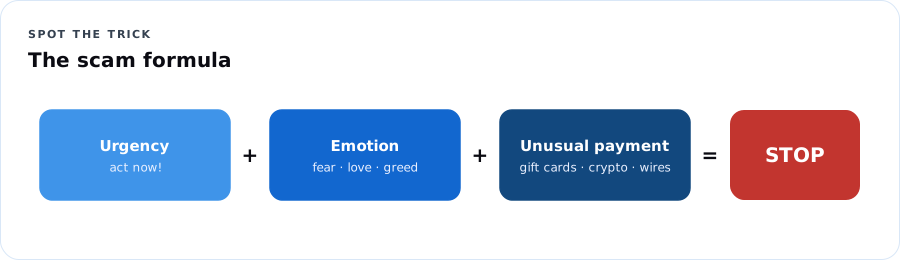
Urgency + Emotion + Unusual payment = STOP.
| Ingredient | Sounds like |
|---|---|
| Urgency | "Act within 24 hours or your account will be closed." |
| Emotion | Fear ("warrant for your arrest"), love ("Grandma, I'm in trouble"), greed ("you've won"), shame |
| Secrecy | "Don't tell anyone." "Don't hang up." |
| Unusual payment | Gift cards, wire transfers, cryptocurrency, payment apps to strangers, cash couriers, gold bars |
Dope Translation: Every scam is a hustle with the same three moves: rush you, rattle you, and get paid in a way you can't take back. Real banks, real government, real family — none of them need gift cards.
1.2 Phishing, smishing, vishing
Red flags:
- Sender address doesn't match the company (support@paypa1-secure.co).
- Links that don't go where they say — on a computer, hover; on a phone, press and hold to preview.
- Requests for passwords, codes, PINs, or ID numbers.
- Package-delivery, toll-road, bank-fraud, and "your account is locked" texts.
- Any one-time code you didn't request — someone is trying to log in as you. Never read a code to anyone.
The golden rule: Don't use the contact info in the message. Go to the real app, website, or the number on the back of your card.
1.3 Common scams right now
| Scam | How it works | Defense |
|---|---|---|
| Grandparent / voice-clone | AI copies a relative's voice from social media clips | Family code word; call back on a known number |
| Government impostor | "IRS / Social Security / police — pay now or be arrested" | Agencies don't demand gift cards or threaten arrest by phone |
| Tech support | Pop-up says your computer is infected, call this number | Close the browser (force quit); never let strangers remote in |
| Romance | Online sweetheart who can't meet, then needs money | Never send money to someone you haven't met in person |
| Investment / crypto | Guaranteed returns, "AI trading," new friend who's a crypto expert | Guaranteed = scam; check Investor.gov |
| Job scams | Easy remote job, they send you a check, you send some back | Real employers don't pay you to buy equipment from them |
| Toll / package texts | "Unpaid toll" or "delivery failed" with a link | Check the real E-ZPass / USPS / UPS site yourself |
| QR code scams | Fake QR stickers on parking meters or flyers | Type the official website yourself |
Activity — Real or Scam? (30 min)
Tables get 12 printed message cards (emails, texts, call scripts). Sort into Real, Scam, Check first. Each table explains one card's red flags. (Facilitator key in the notes.)
Try it first. Move forward with confidence.
Set by host organization · free at many partner sites
Choose a class or cohort that fits your starting point.
Community workshop at rec centers, senior centers, libraries, churches, schools · live virtual
Ask about enrollmentAlready enrolled? Check your course accessThis page includes the course overview, one sample lesson and up to three practice questions. Remaining lessons, labs, capstone and the full practice bank are reserved for enrolled learners. Microsoft exam fees are separate where shown. Cohort dates and included support are confirmed before enrollment.