
Why the master-key approach fails
Imagine asking a coworker to water the office plants. Would you hand over a master key that also opens the finance office, server room, and personnel files? Probably not. You would provide access only to the rooms required for the task. Technology permissions should work the same way, yet organizations sometimes grant powerful roles simply because doing so appears faster than investigating an access request.
Least privilege means giving a person or system only the permissions required for its job. The point is not to distrust good people. It is to reduce unnecessary damage if an account is misused, credentials are stolen, or automation behaves unexpectedly. The smaller the authority, the smaller the set of actions that compromised identity can perform.
Access has three important dimensions
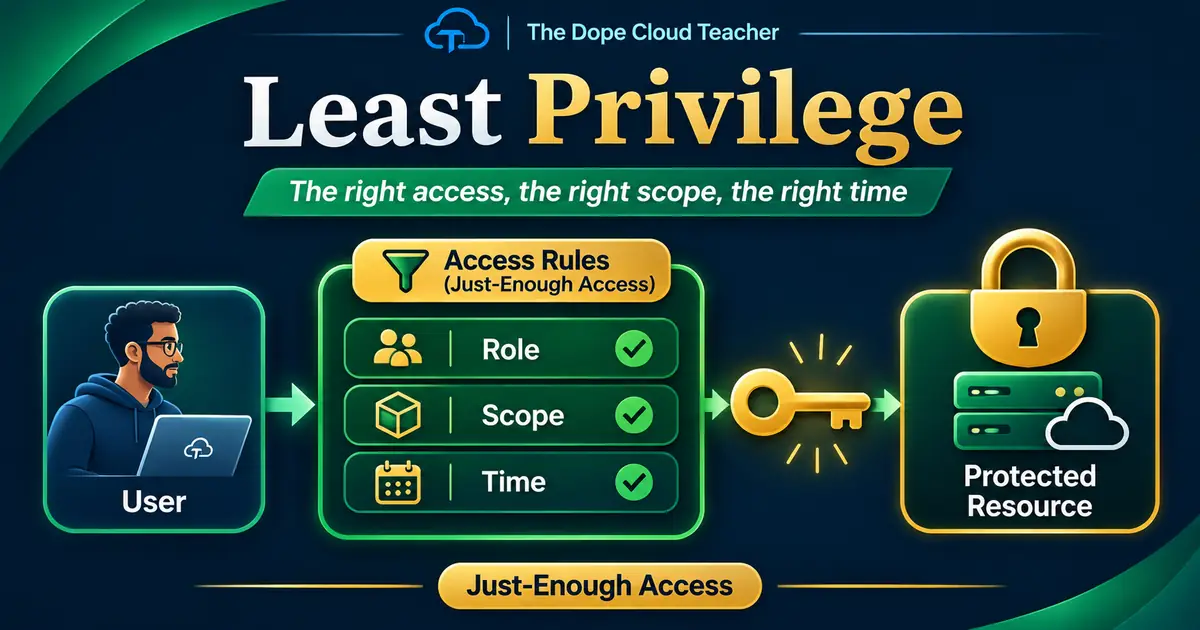
Start with the role: what actions are required? Someone might need to read a configuration, restart a service, update an application, or manage permissions. Those are different levels of authority. Next consider the scope: should access apply to a single resource, a resource group, a subscription, or an entire tenant? Broader scopes expose more systems to unnecessary risk.
Finally ask how long access is necessary. A two-hour troubleshooting task does not automatically justify permanent elevated access. Microsoft recommends matching permissions, scope, and duration to the job. When you use those three questions together, an access request becomes a specific engineering decision instead of a vague demand for administrative power.
Azure RBAC and Entra roles are different
Azure role-based access control, or Azure RBAC, authorizes actions against Azure resources such as storage accounts, virtual machines, resource groups, and subscriptions. Microsoft Entra roles govern identity-directory tasks such as managing users, groups, and enterprise applications. Although both systems use role assignments, they operate on different resource families.
This matters during troubleshooting. If a user cannot work with an Azure storage resource, giving that person a powerful Entra directory role is unlikely to be the right fix. If an administrator needs to manage an app registration, a broad Azure resource-group role may not help. Identify the exact resource and operation before selecting the lowest role capable of doing the work.
What PIM contributes
Privileged Identity Management, or PIM, supports eligible and time-limited privileged access to supported roles and Azure resource assignments when correctly configured and licensed. Instead of leaving a powerful role active all week, an eligible administrator can activate it for an approved task. Organizations may require multifactor authentication, a justification, approval, or an expiration time.
PIM is not a replacement for good role design. A role with unnecessary privileges remains broad while it is active, even if its activation lasts only an hour. Think of PIM as a carefully managed key cabinet. It helps control when someone gets a key, but the security team must still determine which key is appropriate.
Example: somebody cannot access an Azure file share
A colleague reports, “My mapped cloud drive stopped working.” Granting Owner on the subscription might look like a fast solution, but it introduces excessive authority and may not fix the issue. First confirm the user's identity, the affected storage account and share, the connection method, and whether the task requires reading, writing, or managing permissions.
Then check the relevant data-access role assignments, identity setup, network access, and file or directory permissions where applicable. Azure Files access problems can involve multiple layers, so do not assume every error is caused by RBAC. Test the narrowest correct adjustment, record approval, and confirm that access works without creating new exposure.
Include service accounts and automation
Least privilege applies beyond human employees. Managed identities, service principals, scripts, deployment pipelines, and applications often have permissions that nobody has revisited for months. An automated process that only needs to read one secret should not receive the ability to rewrite an entire vault or subscription.
When reviewing a system identity, find out what it actually does, where it runs, and who owns it. Confirm its role, scope, and credential practices. Reduce privileges carefully and test dependencies in a nonproduction setting first. Excessively broad machine identities can be especially dangerous because they operate continuously and may be overlooked during ordinary user-access reviews.
Conduct a small access review
Choose a nonproduction resource group and list its role assignments. Identify inherited assignments and group-based access as well as direct permissions. For each identity, ask: is the role required, can the scope be narrower, should access be time-limited, and who approves changes? Note any assignments that appear unexplained or unused, but verify them before making modifications.
Do not remove production permissions impulsively. Coordinate with owners, consider service dependencies, and create a recovery plan. A disciplined access review combines security with availability. The point is to make systems safer while allowing authorized people and processes to keep doing their jobs.
The takeaway
The simplest rule is still the most powerful: the right person gets the right key for the right door at the right time. Translate that into technical questions about roles, scopes, and duration, and you have the foundation of least privilege. Add multifactor authentication, audit trails, approvals, and recurring reviews to strengthen that foundation.
When someone asks for broader access, respond with curiosity rather than an automatic yes or no. Find the specific task, determine the minimum authority needed, and verify the result. That is how identity security becomes useful engineering instead of a frustrating administrative obstacle.