PG County Parks & Planning Cloud & AI Build Studio
6-week design lab: learn it, build it, show it.
This is your class mission hub. Every week includes a short lecture, a hands-on build, and a mini project you can actually show. Everything here is free and browser-friendly so students ages 15 through adult can create in class without stress.
Class flow each session
Keep every session moving with a rhythm students can trust. Start with energy, build fast, and end with a win.
20 min Spark lecture
- One core concept in plain language
- One real-life cloud or AI example
- One quick check-for-understanding
35 min Build sprint
- Students build with a guided handout
- Pair teens with adults for support
- Instructor circulates for checkpoints
20 min Show + reflect
- 2 to 3 student demos each class
- What worked / what was hard / next step
- Assign tiny at-home bonus challenge
Lecture + lab plan (Sections A and B)
Each week has a Day A and Day B class. Day A introduces the concept and starts the build. Day B finishes, upgrades, and presents. Section A uses Sessions 1-10. Section B uses Sessions 1-12.
Section A: 06/08/2026 - 07/08/2026 (Mon/Wed, 5 weeks, 10 sessions). Section B: 07/20/2026 - 08/26/2026 (Mon/Wed, 6 weeks, 12 sessions).
Week 1: Innovation lab workshop
Build Day- Day A: Build It With AI workshop (90 minutes, high-interaction format).
- Day A challenge: Create business name, slogan, flyer, social post, and pitch.
- Day B: Turn the business into a basic website concept.
- Day B bridge: Introduce cloud naturally by asking where websites live.
- Weekly deliverable: 60-second pitch and starter homepage content.
Week 2: AI prompts and responsible use
Build Day- Day A: Prompt structure lecture (role, task, context, format) and safety basics.
- Day A lab: Prompt Remix challenge with three versions of one prompt.
- Day B: Build a study helper prompt pack for school or work.
- Day B stretch: Create role-based prompts for teen and adult users.
- Weekly deliverable: Prompt card with before-and-after output.
Week 3: Data storytelling with cloud tools
Build Day- Day A: Data literacy lecture (types, trends, and decisions).
- Day A lab: Clean a small CSV and chart it in Google Sheets.
- Day B: Build a "Community Needs Snapshot" data board.
- Day B stretch: Add one AI-generated insight paragraph.
- Weekly deliverable: One chart plus one insight sentence.
Week 4: Cloud security mission
Build Day- Day A: Security lecture (passwords, MFA, phishing, and cloud identity).
- Day A lab: Security checklist sprint for a sample startup.
- Day B: Build a one-page "Secure My Account" guide.
- Day B stretch: Design a phishing simulation and response plan.
- Weekly deliverable: Team security scorecard.
Week 5: Build your cloud + AI portfolio page
Build Day- Day A: Portfolio lecture and examples of entry-level project pages.
- Day A lab: Build a one-page portfolio shell.
- Day B: Add three class artifacts and one reflection video.
- Day B stretch: Add badges, resume link, and contact form.
- Weekly deliverable: Shareable portfolio URL.
Week 6: Demo Day + Future Pathway Map
Showcase- Day A: Career pathways lecture and certification next steps (AZ-900, AI-900).
- Day A lab: Rehearsal lightning demos with peer feedback.
- Day B: Final showcase and personal 90-day learning roadmap.
- Day B stretch: Team concept for community tech impact.
- Weekly deliverable: Final demo plus roadmap card.
Student mission tracker
Check these off each class to keep momentum high. Progress saves in this browser.
Actual classes: step-by-step directions
Class progress tracker
0 of 12 sessions complete (use 10-session target for Section A)
Session 1: Innovation Lab - Build It With AI
Goal: students understand AI and cloud in plain language, then build and pitch an AI-powered business idea.
Workshop outcomes
- Understand what AI and cloud computing are without heavy jargon.
- Generate a practical business idea tied to student interests.
- Use AI prompts to create branding and starter marketing assets.
- Deliver a short business pitch with confidence.
Facilitation mode (for small groups)
- Run this as a workshop, not a lecture. Keep it conversational and interactive.
- Use live prompts together and pause after each output to refine as a team.
- Track points using Cloud Quest to keep energy high.
- Prioritize creating artifacts over explaining theory for long stretches.
Slide-by-slide run of show (on-screen view)
- Slide 1 - Welcome to The Dope Cloud Teacher Innovation Lab: BUILD IT WITH AI. Learn. Create. Launch. Today's Mission: Create an AI-Powered Business.
- Slide 2 - Icebreaker: If someone gave you $500 today, what business would you start tomorrow?
- Slide 3 - What Is AI?: AI is technology that helps humans solve problems faster. Examples: ChatGPT, Siri, Alexa, Netflix recommendations, TikTok feed.
- Slide 4 - What Is The Cloud?: The cloud is renting computers on the internet.
- Slide 5 - Today's Challenge: Create a business name, logo idea, slogan, flyer, social post, and 30-second pitch.
- Slide 6 - Cloud Quest: Level 1 Business Idea (10), Level 2 Name (20), Level 3 Logo Concept (30), Level 4 Flyer (50), Level 5 Pitch (100).
- Slide 7 - Prompt Engineering: A prompt is an instruction. Bad prompt: Create a business. Better prompt: Create a business idea for a 15-year-old interested in gaming with a budget of $500.
- Slide 8 - Activity Time: Open ChatGPT and run: "Give me 10 business ideas I could start with $500."
- Slide 9 - Build The Brand: Prompt AI to create business name, slogan, and mission statement.
- Slide 10 - Build The Marketing: Prompt AI to create a flyer advertising the business.
- Slide 11 - Social Media Challenge: Prompt AI to create an Instagram post, TikTok caption, and Facebook post.
- Slide 12 - Shark Tank Time: Present your business in 60 seconds.
- Slide 13 - What Did We Learn?: AI, cloud, prompting, marketing, and entrepreneurship.
- Slide 14 - Homework: Improve logo, flyer, and pitch. Bonus: create a website mockup.
Session 2: Service model match
Goal: students apply IaaS, PaaS, and SaaS to simple scenarios.
Lab directions
- Read three scenario cards from the board.
- Match each to IaaS, PaaS, or SaaS and explain your choice.
- Create "My App Idea" card with your chosen model.
- Add one cost-saving idea using a cloud calculator.
Session 3: Prompt basics
Goal: students write better prompts with clear structure.
Lab directions
- Open Copilot or ChatGPT and run a basic prompt (version 1).
- Rewrite prompt using role + task + context + format.
- Run version 2 and compare quality.
- Save both outputs in your session notes.
Session 4: Prompt remix challenge
Goal: students produce a reliable study-helper prompt.
Lab directions
- Create prompt version 3 with constraints and output format.
- Test with partner on a real school/work question.
- Apply one bias/safety check before finalizing.
- Publish your final prompt card with examples.
Session 5: Data cleanup sprint
Goal: students clean and prepare a small dataset.
Lab directions
- Open a sample CSV in Google Sheets.
- Fix blank labels and inconsistent values.
- Create one clean table with clear headers.
- Build first chart (bar or line).
Session 6: Data story board
Goal: students turn charts into a practical data story.
Lab directions
- Create a one-page dashboard snapshot from your sheet.
- Write one insight in plain language.
- Add one recommendation based on the trend.
- Share with partner and revise for clarity.
Session 7: Security basics
Goal: students identify core account-security protections.
Lab directions
- Review MFA, password hygiene, and phishing examples.
- Score risks on the class security checklist.
- Pick top three account protections.
- Document one action you can apply this week.
Session 8: Secure account guide
Goal: students build a usable cyber safety guide.
Lab directions
- Create a one-page "Secure My Account" guide.
- Include setup steps for MFA and safe password storage.
- Add one phishing red-flag checklist.
- Swap guides with partner and revise.
Session 9: Portfolio shell
Goal: students launch a one-page project portfolio.
Lab directions
- Open Google Sites or GitHub and create your portfolio page.
- Add title, bio, and skills section.
- Create three project placeholders.
- Publish draft URL.
Session 10: Portfolio upgrade
Goal: students add evidence and improve usability.
Lab directions
- Add screenshots, links, and one short reflection video.
- Include one accessibility improvement (contrast, headings, alt text).
- Link to LinkedIn profile if available.
- Peer review with one actionable improvement note.
Session 11: Demo rehearsal
Goal: students prepare a confident final presentation.
Lab directions
- Build a 3-slide demo deck (problem, solution, impact).
- Practice a 2-minute talk with timer.
- Collect two peer feedback comments.
- Update slides and portfolio links.
Session 12: Final showcase
Goal: students present final work and set next steps.
Lab directions
- Deliver final 2-3 minute showcase.
- Submit portfolio link and top project artifact.
- Create a 90-day learning plan (certification + project goal).
- Connect with one classmate on LinkedIn for accountability.
Instructor notes for lecture delivery
Use these notes as your quick facilitation script so lecture and lab transitions stay smooth, inclusive, and on-time.
Before class (10-minute setup)
Open this page, pre-open Microsoft Learn tabs, and test one link from the Cloud and AI lab blocks. Put students into pairs before lecture begins so no one gets stuck solo during build sprint.
Small-group workshop playbook
- If class size is 2 to 5 learners, skip long decks and run live co-building.
- Treat each prompt as a mini challenge with immediate discussion.
- Keep each section moving: explain in 60 seconds, then build.
- Use points + quick celebrations after each completed artifact.
Lecture pacing (20 minutes)
- Minute 0-4: anchor concept in plain language.
- Minute 5-10: one demo, no more than 3 clicks deep.
- Minute 11-16: quick comprehension checks.
- Minute 17-20: explain build success criteria.
Build sprint coaching (35 minutes)
- Run checkpoint every 10 minutes.
- Use two-level support: core win + pro move.
- If blocked, switch student to simulation path so momentum continues.
- Require one screenshot or one note artifact per student.
Mixed-age engagement
- Pair one confident navigator with one explainer.
- Give teen learners visual tasks first, adults architecture decisions first.
- Rotate speaking roles during share-out.
- Celebrate iteration, not perfection.
Certification tie-in (last 5 minutes)
- Map todayΓÇÖs lab to AZ-900, AI-900, or SC-900 objective area.
- Assign one Microsoft Learn module for home practice.
- Have students update portfolio notes immediately.
- Close with one next-step action per student.
Wednesday bridge: Build your website
- Use AI to generate homepage copy, About section, services, FAQ, and customer reviews.
- Frame it as business execution, not abstract technology theory.
- Then ask: "Guess where websites live?" and connect naturally to cloud infrastructure.
- Keep discovery-based teaching: learners experience first, then name the concept.
Official platforms and links (with logos)
Use these direct links for labs and assignments. All links open official platform pages.

Microsoft Azure Portal
Sign in to create and manage cloud resources in Azure.

Microsoft Learn
Official free learning modules and labs for Azure and AI topics.
Azure Lab Services
Official Azure Labs overview for classroom lab environments.

GitHub
Store class projects, version history, and collaborate on builds.

Publish portfolio wins and build professional connections.
Classroom vibes visual board
Use these visuals in class promos and rec center communications to show the energy of your lab.

Rec Center Learning Lab
Community classroom feel with students collaborating around tech projects.

Instructor Leadership
Hands-on facilitation and confidence-building in a practical computer lab setup.
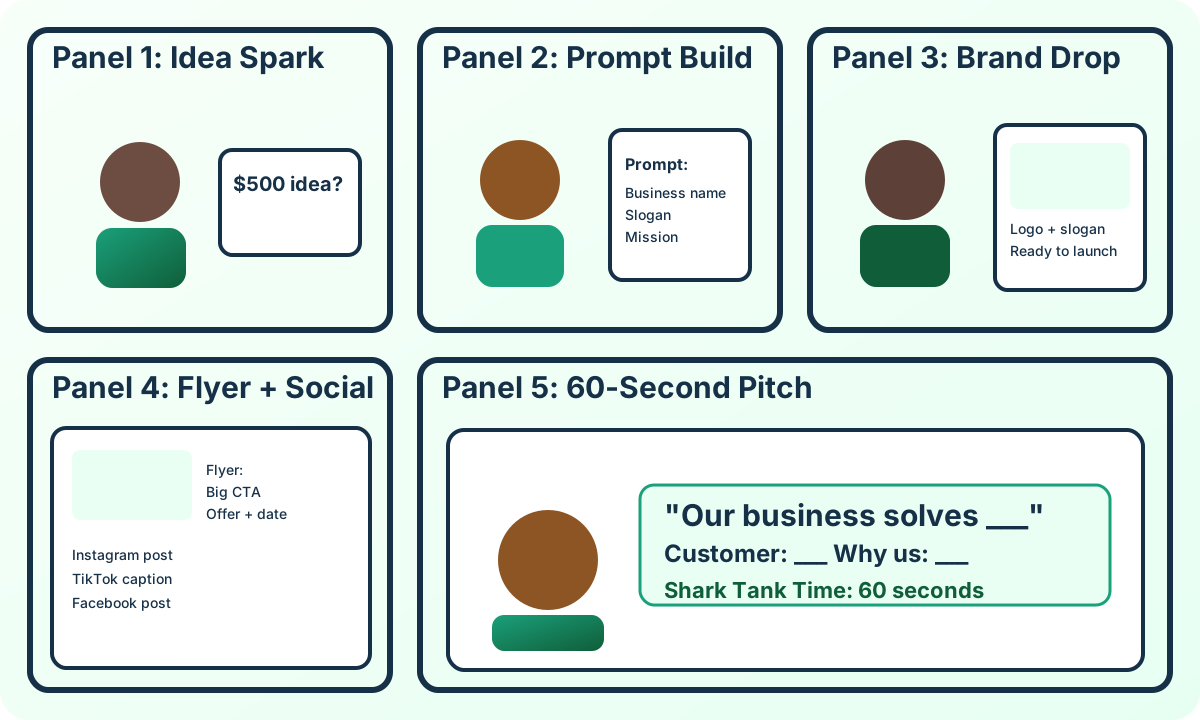
Comic Strip Storyboard
A playful sequence from idea spark to final pitch for flyers and social posts.

Feature Your Photo
Upload your own classroom photo to personalize this visual board in your browser.
Student account path: no-credit, low-complexity options
Use this order so students can learn and build without credit-card barriers or setup overload.
Path A: Microsoft Learn + Sandbox (recommended first)
Most modules can be completed directly in browser with guided steps. Many labs use sandbox environments that do not require personal billing setup.
- Sign in with school/personal Microsoft account.
- Start module and look for sandbox activation instructions.
- Complete guided task + checkpoint quiz.
Path B: Azure for Students (when eligible)
For eligible students, Azure for Students can provide credits and usually avoids requiring a credit card for signup.
- Use student/school verification.
- Create starter resource group and practice deployments.
- Set spending safeguards and shutdown reminders.
Path C: Simulation-only class mode
If accounts are blocked, run scenario labs in this page + Microsoft Learn reading/checks so no one falls behind.
- Use cloud and AI lab cards as role-play simulations.
- Complete cyber interactives below.
- Submit reflection + architecture sketch for credit.
| Certification | Best labs to start | Main skills | Official prep link |
|---|---|---|---|
| AZ-900 Azure Fundamentals | Cloud Labs 1, 2, 3, 4, 6 | Cloud concepts, core services, pricing, governance | AZ-900 page |
| AI-900 Azure AI Fundamentals | AI Labs 1 through 6 | AI workloads, vision, language, generative AI, responsible AI | AI-900 page |
| SC-900 Security, Compliance, and Identity | Cloud Lab 5 + Cyber Scenarios 1, 2, 3 | Identity, threat response, security controls, compliance mindset | SC-900 page |
Real-time cyber scenario interactives (3)
Run these in class as live decision games. Students pick an action, submit, and get immediate feedback tied to cert-ready security thinking.
Scenario 1: Phishing in Team Chat
A teammate sends an urgent "invoice" link in chat. You are project lead. What should happen first?
Awaiting team decision.
Scenario 2: Public Storage Exposure
A storage container with student submissions is accidentally public. What is the best immediate response?
Awaiting team decision.
Scenario 3: Suspicious Login Alert
You receive an alert for impossible travel login on a shared class admin account.
Awaiting team decision.
Cyber sim score: 0 of 3 correct
Grab-and-go class assets
Use these pages during class for lectures, pathways, and student access in one click.